Evaluating the Decorative Easter Basket Laser Cut File for Seasonal Crafting Projects
As the spring season approaches, makers and small business owners often begin scouting for designs that balance aesthetic appeal with manufacturing feasibility. The Decorative Easter Basket Laser Cut File has emerged as a popular choice for those utilizing CO2 lasers, diode lasers, or CNC routers. Unlike simple 2D cutouts, this specific design category typically employs a multilayer layout strategy to create depth and structural integrity without requiring complex joinery techniques. Understanding the nuances of these digital files is essential for anyone looking to produce high-quality Easter egg holders or gift containers efficiently.
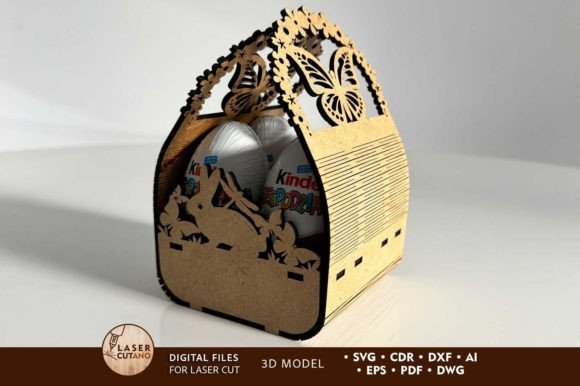
At its core, a Decorative Easter Basket Laser Cut File is a vector-based blueprint designed specifically for subtractive manufacturing. The version discussed here features a multilayer architecture, usually comprising around seven distinct layers that stack to form a three-dimensional object. With finished dimensions often hovering around 3 x 4 inches, these baskets are sized perfectly for holding standard chocolate eggs or small treats. What distinguishes this file type from generic SVG downloads found on free repositories is the precision engineering applied to the kerf compensation and layer alignment. When working with materials like 3mm plywood, MDF, or acrylic, the difference between a wobbly assembly and a sturdy final product often lies in how well the digital file accounts for material thickness and laser beam width.
Comparing Multilayer Designs to Traditional Construction Methods
When evaluating production methods for seasonal decor, crafters generally choose between traditional hand-building, single-layer laser cutting, and multilayer stacking. The Decorative Easter Basket Laser Cut File falls squarely into the multilayer category, offering a distinct set of advantages and trade-offs compared to the alternatives.
Traditional hand-built baskets, made from woven reeds or bent wood, offer a classic organic look but suffer from inconsistency and high labor costs. Each unit requires significant time to assemble, making them less viable for batch production. In contrast, single-layer laser cut designs are fast to produce but often lack the visual weight and durability required for a functional container. They can appear flat and may struggle to hold heavier items without warping.
The multilayer approach utilized by this Easter basket design bridges the gap. By stacking seven layers of 3mm material, the creator achieves a substantial wall thickness (approximately 21mm) that provides excellent rigidity. This method allows for intricate patterns, such as the cheerful Easter bunny motifs mentioned in the design specifications, to be revealed through the negative space of alternating layers. However, this comes with a trade-off: assembly time. While the cutting process is automated, the gluing and painting process is manual. Users must decide if the enhanced aesthetic value justifies the additional post-processing labor compared to a snap-fit single-layer alternative.
Material Selection and Compatibility Considerations
The versatility of the Decorative Easter Basket Laser Cut File is one of its strongest assets, yet material choice significantly impacts the final outcome. The design is optimized for 3mm thickness, which is a standard size for birch plywood, MDF, and cast acrylic. Each material brings different characteristics to the project.
- Plywood: Offers a natural, rustic charm that fits well with spring themes. The grain adds texture, but users must be cautious of voids in lower-grade plywood that can ruin the fine details of the bunny motif.
- MDF: Provides a smooth, uniform surface ideal for painting. Since the design recommendation suggests painting before gluing, MDF is often the preferred choice for creators wanting a solid, opaque color finish without visible wood grain.
- Acrylic/Plexiglas: Creates a modern, translucent look. When using acrylic, the "glow" effect from edge-lighting can be striking, but care must be taken during cutting to avoid melting edges, which can interfere with the tight tolerances needed for stacking seven layers.
It is crucial to note that while the file formats provided (AI, SVG, DXF, DWG, CDR, EPS, PDF) ensure compatibility with almost any cutting software, the physical properties of the material dictate the success of the build. For instance, increasing the design size is generally safe, but reducing it poses risks. The intricate elements of the laser cut file, such as thin connecting bridges or detailed ears on the bunny motif, may become too fragile to cut or handle if scaled down significantly below the intended 3 x 4 inch footprint.
Workflow Efficiency and Post-Processing Requirements
Adopting a Decorative Easter Basket Laser Cut File requires a shift in workflow compared to standard cut-and-assemble projects. The instruction to "paint before gluing" is a critical decision factor. In a typical assembly, one might build the object and then paint the exterior. However, with a seven-layer stack, the internal edges of each layer become visible in the final stepped profile. Painting individual layers prior to assembly ensures complete coverage and a professional finish, but it drastically increases the preparation time.
This workflow is best suited for makers who prioritize finish quality over speed. For a hobbyist making a single gift, the extra time is negligible. For a small business aiming to produce hundreds of units for an Easter market, this pre-painting requirement represents a significant bottleneck. In such cases, producers might opt for pre-colored materials (like stained plywood or colored acrylic) to bypass the painting step, though this limits color customization options.
Furthermore, the need to unzip the downloaded folder and organize multiple file formats suggests a level of technical familiarity. Users must select the correct file for their specific machine software—CorelDRAW users will prefer CDR, while LightBurn users might opt for SVG or DXF. Mismanaging these files can lead to scaling errors, where dimensions are imported in millimeters instead of inches, ruining the fit of the layers.
When This Design Is the Right Choice
Determining whether the Decorative Easter Basket Laser Cut File is the appropriate resource depends on your specific goals, equipment, and target audience. This design is an excellent fit when:
- Depth and Detail Are Priorities: If the goal is to create a keepsake item rather than a disposable container, the multilayer depth offers a premium feel that flat cuts cannot match.
- Material Scrap Utilization Is Key: The small 3 x 4 inch footprint allows makers to utilize offcuts from larger projects, maximizing material efficiency.
- Customization Is Desired: The layered structure allows for creative color blocking. For example, alternating light and dark wood stains or using contrasting acrylic colors can create unique visual effects not possible with solid construction.
Conversely, this file may not be the ideal solution if speed is the primary metric. If you are running a high-volume operation with tight deadlines, the labor intensity of painting and gluing seven separate pieces per unit may erode profit margins. Additionally, if your laser cutter struggles with fine detail or if you are restricted to materials thicker or thinner than 3mm without the ability to adjust the file vectors, you may encounter fitting issues.
Making an Informed Decision
In the landscape of digital crafting resources, the Decorative Easter Basket Laser Cut File stands out as a robust option for creating detailed, durable seasonal decor. Its multilayer design leverages the capabilities of modern laser cutters to produce objects that mimic traditional craftsmanship with digital precision. However, it demands a thoughtful approach to material selection and post-processing.
Prospective users should weigh the aesthetic benefits of the seven-layer construction against the increased assembly time. By understanding the limitations regarding scaling and the necessity of pre-painting, makers can effectively plan their production runs. Whether used for personal gifting or small-scale commercial sales, this file type offers a balanced blend of charm and functionality, provided the creator respects the technical requirements of the multilayer format. As with any digital asset, testing a single prototype with your specific machine settings and material batch is the most reliable way to ensure the final product meets your expectations before committing to a full production run.