Vintage Round Digital Frames: A Practical Guide for Crafters and Designers
In the evolving landscape of digital crafting, the intersection of nostalgia and modern technology offers unique opportunities for creativity. Vintage Round Digital Frames have emerged as a versatile asset for anyone looking to add a touch of classic elegance to their projects. Whether you are a seasoned scrapbooker, a small business owner creating branded packaging, or a hobbyist exploring decoupage, these digital assets provide a foundation for high-quality, personalized designs. However, integrating digital elements into physical crafts requires more than just a download button. Understanding the technical specifications, licensing nuances, and application methods is crucial to ensuring your final product meets professional standards.
This guide aims to clarify common misconceptions and provide actionable advice on how to effectively utilize these resources. By avoiding typical pitfalls, you can streamline your workflow, enhance the aesthetic quality of your creations, and ensure you are respecting intellectual property rights while maximizing the value of your purchase.
Understanding the Technical Specifications
One of the most frequent errors creators make is overlooking the technical details of digital downloads. When you acquire a pack of Vintage Round Digital Frames, you are not just getting images; you are acquiring tools that must fit specific production requirements. The standard for high-quality printing is 300 DPI (dots per inch). Many beginners mistakenly use web-resolution images (72 DPI) for print projects, resulting in pixelated, blurry outputs that diminish the perceived value of their work.
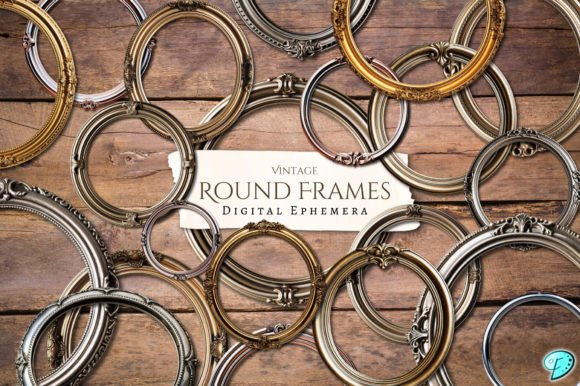
The digital pack in question offers files at 1500 × 1500 pixels at 300 DPI. This resolution is ideal for small to medium-sized paper crafts such as gift tags, envelope liners, and journal pockets. It ensures that when printed, the edges of the frames remain crisp and the vintage textures retain their depth. Using these transparent PNGs allows for seamless layering over photographs, patterned papers, or solid backgrounds without the awkward white boxes that often accompany JPEG files.
Key Check: Before starting any project, verify that your design software supports transparent layers. Programs like Photoshop, Procreate, Canva, and even some advanced mobile apps handle PNG transparency well. If you are new to digital design, take a moment to learn how to manage layers, as this is where the true magic of these frames comes to life.
Navigating File Compatibility and Operating Systems
A surprisingly common issue arises from differences between operating systems, specifically between macOS and Windows. The product description notes that MacOSX files are included in the zip archive. For Windows users, encountering filenames with ._ prefixes can be alarming, leading many to believe that files are missing or corrupted.
This is a misunderstanding of how macOS handles metadata. These extra files are simply system artifacts used by Apple devices and do not contain the actual image data. If you are a Windows user, ignore any file starting with ._. Focus on the clean filenames. If you open the zip file and see fewer items than expected, do not panic. Instead, check the total count against the description—25 different metal printable frames in this case. Extracting the entire folder rather than individual files can sometimes help organize the content better and avoid confusion.
Practical Advice: Always extract the full zip file to a dedicated folder on your computer before beginning your design work. Working directly from within a compressed zip folder can lead to saving errors or accidental overwrites. Organizing your assets immediately after download saves time and reduces frustration during the creative process.
Licensing Ethics and Commercial Use
Intellectual property rights are a critical aspect of using digital assets. A significant mistake some entrepreneurs make is assuming that purchasing a digital download grants them unrestricted rights to resell the item as-is. The terms for these Vintage Round Digital Frames are clear: you may not re-sell these products in their original digital format or as physical prints without considerable alteration.
This restriction protects the artist’s livelihood while still allowing you to create value-added products. For instance, using a frame as part of a larger collage for a junk journal page is acceptable. Selling a printed poster that is nothing but the frame itself is not. The key phrase here is "considerable alteration." Your final product should be a new creation where the frame is one component among many, such as mixed media elements, hand-drawn illustrations, or text.
Better Approach: If you plan to sell physical items like greeting cards or gift wrap, ensure that the frame is integrated into a unique design. Combine it with other graphics, typography, or textures. This not only complies with licensing agreements but also makes your product more distinctive and appealing to customers who are looking for something unique rather than generic clip art.
Creative Applications Beyond Scrapbooking
While scrapbooking and junk journals are obvious uses for these frames, limiting your imagination to these categories means missing out on broader applications. The versatility of transparent PNGs allows for integration into various paper crafts and even digital marketing materials.
- Gift Wrap and Tags: Print the frames on cardstock, cut them out, and attach them to handmade gifts. The vintage metal aesthetic adds a sophisticated touch to holiday presents or wedding favors.
- Pocket Envelopes: Use the frames as decorative borders on the flaps of handmade envelopes. This adds a professional finish to correspondence or invitation suites.
- Decoupage Projects: Apply the printed frames onto wooden boxes, trays, or furniture pieces using decoupage glue. The high-resolution print ensures the details hold up even when sealed with varnish.
- Digital Marketing: Bloggers and social media managers can use these frames to highlight product photos or quotes in Instagram posts, creating a cohesive brand aesthetic that stands out in crowded feeds.
By thinking beyond traditional paper crafts, you maximize the utility of your purchase. The blend of hand-drawn illustrations, mixed media, and digitally enhanced visuals found in these frames offers a rich texture that complements both rustic and modern design styles.
Evaluating Quality and Artistic Integrity
When selecting digital assets, it is essential to evaluate the artistic integrity of the work. The creator of this pack combines found imagery with generated elements and digital enhancements. This hybrid approach ensures that each frame has a unique character, avoiding the sterile look of purely computer-generated graphics.
Before committing to a large project, test print a single frame on the paper stock you intend to use. Different papers absorb ink differently, which can affect the vibrancy of the vintage tones. Matte papers often enhance the aged look of vintage designs, while glossy papers might make the colors pop but reduce the authentic feel. Adjusting your printer settings to "high quality" or "photo" mode can also make a significant difference in the final output.
Final Recommendation: Treat these digital frames as foundational elements in your creative toolkit. Respect the licensing terms, understand the technical requirements, and experiment with diverse applications. If you have questions about specific use cases or encounter technical issues with the files, reaching out to the creator directly is the best course of action. Most designers are happy to clarify usage rights or assist with file access issues, ensuring a positive experience for all parties involved.
By approaching Vintage Round Digital Frames with knowledge and creativity, you transform simple digital files into tangible, beautiful artifacts that enhance your personal and professional projects. Avoid the shortcuts, respect the craft, and let your imagination guide the way.