Graduation Decorative Laser Cut File Guide
Capturing the milestone of academic achievement requires more than just a diploma; it demands a celebration that reflects the effort and joy of the journey. For creators, educators, and small business owners, the Graduation Decorative Laser Cut File offers a precise pathway to producing memorable keepsakes and event decor. This digital asset is not merely a collection of lines on a screen; it is a blueprint for transforming raw materials into tangible memories. Whether you are operating a Glowforge in a home studio or managing a CNC router in a professional workshop, having access to high-quality, pre-engineered designs can significantly streamline your production workflow while ensuring a polished final result.
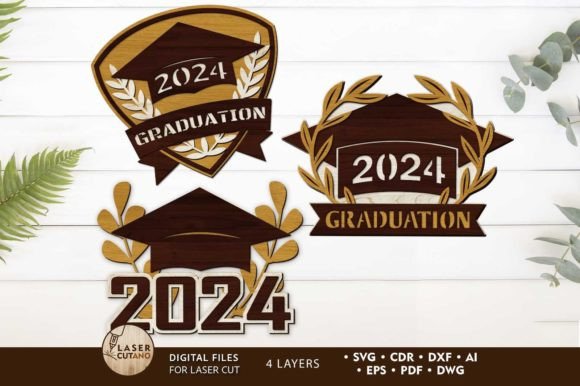
The core value of utilizing a dedicated Graduation 2024 Digital multilayer layout lies in its engineering precision. Unlike generic vector art found online, these files are specifically prepared for laser cut, CNC router machines, and other cutting technologies. This preparation means the kerf—the width of material removed by the laser or blade—has been accounted for, and the joints are designed to fit snugly without requiring excessive sanding or adjustment. When you download the product, you receive a comprehensive .zip file containing formats compatible with nearly every industry-standard software, including .AI, .SVG, .DXF, .DWG, .CDR, .EPS, and .PDF. This versatility ensures that whether you prefer Adobe Illustrator, CorelDRAW, or free alternatives like Inkscape, the file integrates seamlessly into your existing design ecosystem.
Optimizing Material Selection and Thickness
One of the most critical aspects of successful laser cutting is matching the design to the appropriate material. The Graduation Decorative Laser Cut File discussed here is optimized for a material thickness of 3mm. This specific dimension strikes an ideal balance between structural integrity and aesthetic delicacy. At 3mm, materials like plywood, MDF, acrylic, and plexiglas offer enough depth to create shadow effects in multilayer designs while remaining light enough for hanging ornaments or tabletop displays.
For those working with wood, 3mm birch plywood provides a warm, natural finish that pairs beautifully with school colors when painted. If durability and a modern look are priorities, 3mm acrylic or plexiglas offers a sleek, translucent quality that catches light effectively. It is important to note that while the design is calibrated for 3mm, slight variations in material thickness can occur between manufacturers. Always measure your stock before cutting. If your material deviates significantly, you may need to adjust the slot widths in your software to ensure a tight friction fit, although the original file is tuned for standard 3mm sheets.
Understanding the Multilayer Assembly Process
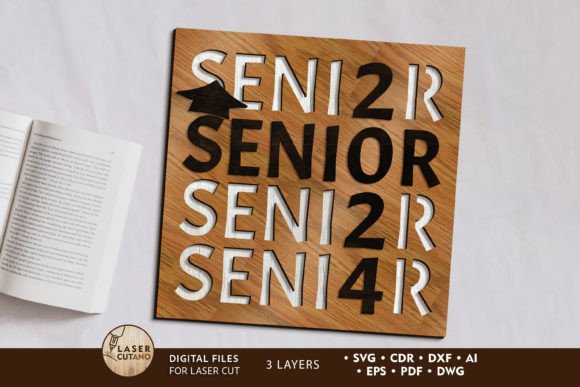
The finished product from this school laser cut design measures 10 x 10 inches, providing a substantial presence suitable for wall hangings, photo backdrops, or centerpiece decorations. The beauty of this specific layout is its multilayer construction. Rather than a single flat piece, the design relies on stacking multiple layers to create depth and dimension. This approach mimics the look of expensive 3D modeling but is achieved through accessible 2D cutting technology.
To achieve the best results, the assembly process requires a strategic approach. Each layer of the multilayer model is intended to be glued together. However, a common mistake among beginners is assembling the pieces before finishing them. For a professional-grade outcome, it is highly recommended to paint before gluing. Painting individual layers before assembly ensures that no unpainted edges are visible once the pieces are stacked. It also prevents glue from interfering with paint adhesion and allows for easier handling of intricate details. Once painted and dried, the layers can be bonded using wood glue for porous materials or solvent cement for acrylics, resulting in a solid, unified object.
Scalability and Design Limitations
Flexibility is a key feature of vector-based assets. You can increase the size of this graduation laser cut design to accommodate larger displays or different project requirements. Scaling up generally poses no technical issues, provided your machine bed is large enough to handle the expanded dimensions. However, caution is required when reducing the design size. As the overall footprint shrinks, the thin elements within the intricate patterns also decrease in width. If scaled down too far, these delicate bridges and connectors may become too fragile to survive the cutting process or may break during handling and assembly.
When considering a reduction in size, always preview the smallest features in your software. A good rule of thumb is to ensure that no connecting element is thinner than the material thickness itself, though this varies based on the tensile strength of your chosen medium. If you intend to produce miniature versions for favors or keychains, you may need to manually thicken specific vectors in your editing software to maintain structural integrity.
Practical Applications for Creators and Educators
The utility of a 2024 graduation dxf file extends across various user groups. For small business owners and entrepreneurs, these files represent an opportunity to create limited-edition merchandise with low overhead. Since the file is digital, there is no inventory cost until a sale is made. You can produce custom class gifts, commemorative plaques, or decorative signage on demand. The ability to swap materials allows you to offer different price points; a budget-friendly MDF version for students and a premium acrylic version for faculty or donors.
Educators and school administrators can also leverage these school cnc and school xtool compatible files to enhance end-of-year ceremonies. Instead of purchasing mass-produced plastic decorations, schools can involve vocational students in the production process, turning the creation of the decor into a practical lesson in manufacturing and design. Furthermore, bloggers and content creators in the DIY niche can use these layouts to generate engaging tutorials, demonstrating how digital files translate into physical art, thereby driving engagement through visual storytelling.
Technical Preparation and Workflow Efficiency
Efficiency in a workshop is often dictated by file readiness. Upon payment, the immediate availability of the .zip folder allows for instant project initiation. However, a crucial step often overlooked is unzipping the folder before attempting to import files into your cutting software. Running operations directly from a compressed archive can lead to path errors or corrupted reads. Once extracted, the variety of formats ensures compatibility with diverse workflows. For instance, a laser cutting file 2024 in DXF format is ideal for CAD-centric environments, while SVG is preferred for web-based cutter interfaces like Glowforge.
By utilizing a professionally prepared Graduation Decorative Laser Cut File, you eliminate the hours typically spent drawing complex vectors from scratch. This time savings allows you to focus on the finishing touches—sanding, painting, and packaging—that truly differentiate a handmade item from a factory product. Whether you are fulfilling a bulk order for a local high school or creating a unique gift for a graduate in your family, these digital layouts provide the reliability and precision needed to execute your vision with confidence.
In conclusion, the intersection of digital design and physical fabrication offers powerful tools for celebration. With the right materials, proper painting techniques, and an understanding of scaling limitations, this graduation laser svg and its accompanying formats serve as a robust foundation for creative success. Enjoy the process of bringing these designs to life, knowing that the technical heavy lifting has already been handled, leaving you free to focus on craftsmanship and creativity.