Graduation Decorative Template: Create 3D Keepsakes
Celebrating a milestone like graduation requires something special, something that stands out from the standard paper certificates and generic greeting cards. This is where a Graduation Decorative Template, Cut File becomes an invaluable tool for creators and crafters. Whether you are a hobbyist looking to make a unique gift for a loved one or a small business owner aiming to expand your product line for the spring season, these digital files offer a professional foundation for creating stunning three-dimensional decor.
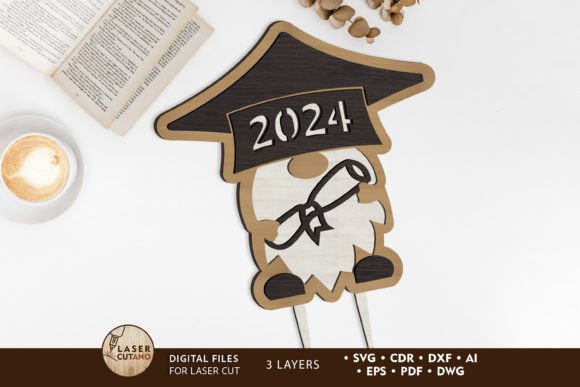
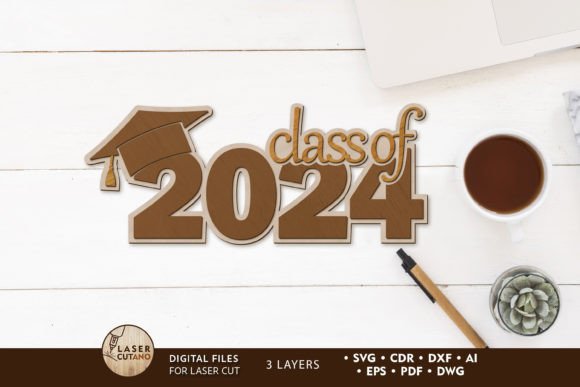
At its core, this product is a set of precision-engineered digital layouts designed specifically for laser cutters, CNC routers, and other computer-controlled cutting machines. Unlike simple 2D vectors, this Graduation 2024 Digital multilayer layout is constructed to build depth. When assembled, the finished product measures approximately 5 x 6 x 1.5 inches, creating a substantial, freestanding piece that serves as a memorable desk ornament or shelf display. The design accounts for material thickness, ensuring that each layer fits together snugly to form a cohesive, sturdy structure.
Why Choose a Multilayer Laser Design?
The appeal of using a pre-made graduation laser cut file lies in the balance between creative freedom and technical reliability. Designing a multilayer object from scratch requires a deep understanding of kerf (the width of the cut), material compression, and structural integrity. If the layers are too tight, the pieces won't fit; if they are too loose, the model will fall apart. By utilizing a professionally prepared template, you bypass the trial-and-error phase of engineering the geometry.
These files are optimized for a specific material thickness, typically 3mm. This standard thickness is ideal for materials like plywood, MDF, acrylic, and plexiglass. The design ensures that when you stack the layers, the final height and visual proportions are exactly as intended. For beginners, this removes the intimidation factor of CAD software, allowing you to focus on the finishing touches that make the piece unique, such as painting, staining, or adding personal embellishments.
Versatile File Formats for Every Machine
One of the most practical aspects of this digital product is its compatibility. After purchase, you receive a .zip folder containing the design in a wide array of industry-standard formats: .AI, .SVG, .DXF, .DWG, .CDR, .EPS, and .PDF. This versatility means that regardless of the equipment you own or have access to, you can get started immediately.
- Laser Cutter Owners: Users of popular machines like Glowforge, xTool, or Omtech can simply import the .SVG or .DXF files directly into their operating software. These formats preserve the vector paths necessary for clean, precise cuts.
- CNC Router Users: Those working with wood routers often prefer .DXF or .DWG files, which integrate seamlessly with CAM software to generate toolpaths for carving or cutting.
- Graphic Designers: If you plan to modify the design or incorporate it into a larger marketing layout, the .AI and .EPS files allow for easy editing in Adobe Illustrator or CorelDRAW.
It is important to remember to unzip the folder before attempting to use the files. Trying to load a compressed archive directly into your cutting software will result in errors. Once extracted, you have instant access to the tools needed to bring your vision to life.
Ideal Materials and Assembly Tips
To achieve the best results with this school laser cut design, material selection is key. The recommended thickness is strictly 3mm. While you can scale the design up to create a larger centerpiece, you must be cautious when scaling down. Reducing the overall size also reduces the width of the connecting tabs and intricate details, which may become too fragile to cut or assemble properly if the design is shrunk too much.
Popular material choices include:
- Plywood: Offers a natural, warm look that stains beautifully. Birch plywood is a favorite for its smooth grain and lack of voids.
- MDF: A cost-effective option that paints very smoothly, ideal for school colors or vibrant custom designs.
- Acrylic/Plexiglas: Provides a modern, sleek aesthetic. Transparent or metallic acrylics can catch the light, making the "2024" text pop.
A crucial pro-tip for assembly is to paint before gluing. Because this is a multilayer model, once the layers are adhered, many surfaces become inaccessible. Applying your base coat, accents, or sealant to the individual layers while they are flat ensures complete coverage and a professional finish. After the paint dries, you can glue the layers together, building the 1.5-inch depth layer by layer.
Practical Uses for Creators and Educators
The applications for a graduation decorative template extend far beyond a single project. For educators and school administrators, these files can be used to create批量 (batch) awards for honor roll students or graduating seniors. Instead of buying expensive, mass-produced trophies, schools can produce personalized, high-quality keepsakes in-house if they have access to a maker space or fabrication lab.
For entrepreneurs and Etsy sellers, this represents a low-overhead opportunity. Digital products eliminate shipping costs for the seller, but physical成品 (finished goods) made from these files command a higher price point than flat signs. You can offer customization services, such as adding the graduate's name to the base layer or using school-specific color schemes. The "2024" element makes it timely, but the underlying structure of the design is timeless enough that with minor edits, it could serve future classes as well.
Hobbyists will find this project satisfying because it combines technical cutting with artistic expression. It serves as an excellent introduction to 3D assembly without requiring complex joinery skills. The interlocking nature of the laser-cut parts does the heavy lifting, allowing the maker to feel accomplished upon seeing the final structure stand on its own.
Important Considerations Before You Start
Before diving into production, there are a few logistical details to keep in mind. First, always test your machine settings on a scrap piece of your chosen material. Even though the file is optimized for 3mm, different batches of plywood or acrylic can vary slightly in actual thickness. A quick test cut ensures your tabs fit perfectly.
Secondly, consider the environment where the finished piece will be displayed. If it is intended for outdoor use, ensure you use weather-resistant materials like marine-grade plywood or UV-stable acrylic, and apply a protective clear coat. For indoor desk displays, standard MDF or birch is sufficient.
Finally, embrace the creative process. While the laser cutting file 2024 provides the structure, your choice of finish defines the character. Whether you go for a rustic wood burn look, a glossy school-spirit paint job, or a minimalist matte black finish, the template is merely the canvas. With the right preparation and a bit of creativity, these digital files transform into cherished memories that celebrate hard work and new beginnings.